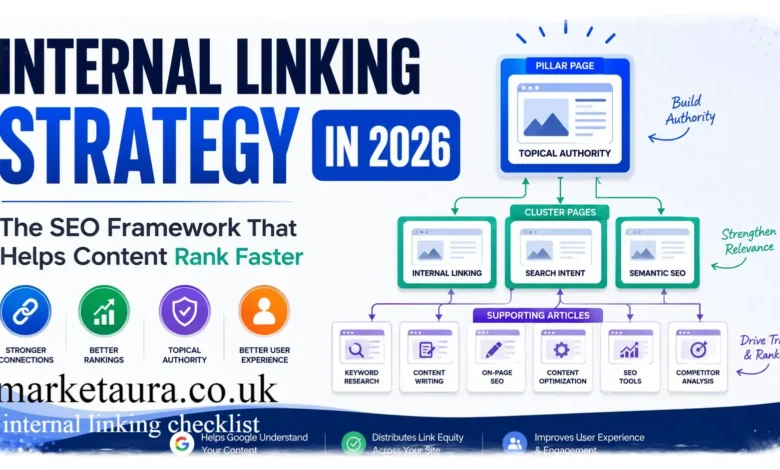
Introduction
Have you ever published a great article, only to watch it sit quietly on page three of Google while older posts on your site keep grabbing all the traffic? That usually is not a content quality problem. It is an internal linking checklist problem. Most site owners obsess over backlinks and forget that the links already living inside their own website carry enormous power.
An internal linking checklist gives you a repeatable way to connect your pages so search engines and readers both understand what matters most on your site. In this article, I will walk you through what internal linking actually means, why it matters so much for rankings, how many internal links you really need per page, and a full checklist you can apply today. You will also find comparison tables, examples, and a workflow you can copy for every new post you publish.
What Is Internal Linking?
internal linking checklist simply the practice of connecting one page on your website to another page on the same website using a clickable link. Think of your site as a small city. Internal links are the roads that let visitors, and search engine crawlers, move from one building to the next.
When you link your blog post about running shoes to your buying guide on foot injuries, you are creating an internal link. It sounds basic, yet this small action does three important jobs at once. It helps users discover more content. It helps search engines crawl and index your pages. And it passes authority, often called link equity, from strong pages to weaker ones.
Why Is Internal Linking Important?
Internal linking is not just a technical checkbox. It shapes how your entire site performs in search results.
Here is why it deserves your full attention. source: Medium · Mat BT
It spreads authority across your site. When a page earns backlinks from other websites, that page gains ranking power. Internal links let you channel some of that power toward newer or weaker pages that need a boost.
It improves crawlability. Search engine bots follow links to discover new content. A page with zero internal links pointing to it, often called an orphan page, can take much longer to get indexed, or may never get indexed at all.
It keeps readers on your site longer. A well placed internal link answers a reader’s next question before they even ask it. That lowers bounce rate and increases time on site, both of which search engines quietly reward.
It builds topical relevance. Grouping related articles together through links signals to Google that you have real depth on a subject. This is a core part of entity based SEO, where search engines connect the dots between your content and the topics, people, and concepts it represents.
It guides users toward conversion. A smart internal link can move a reader from an informational blog post straight to a product page or service page at exactly the right moment. marketaura
How Many Internal Links Per Page?
This is the question I get asked most often, and the honest answer is that there is no single magic number. That said, most SEO practitioners agree on a sensible range.
For a standard blog post of around 1,000 to 1,500 words, aim for 3 to 5 internal links. For longer, more comprehensive guides above 2,000 words, you can comfortably use 5 to 10 internal links, as long as each one adds genuine value.
The rule I follow personally is simple. Every link should help the reader, not just help your SEO. If a link feels forced or unrelated, remove it. Quality always beats quantity here.
Quick Reference Table
| Content Length | Recommended Internal Links | Notes |
|---|---|---|
| Under 800 words | 2 to 3 links | Keep it light, avoid clutter |
| 800 to 1,500 words | 3 to 5 links | The sweet spot for most blog posts |
| 1,500 to 2,500 words | 5 to 8 links | Group links by subtopic |
| 2,500+ words (pillar content) | 8 to 12 links | Link to supporting cluster pages |
Internal Linking Checklist
Here is the full step by step checklist you can run through every single time you publish or update a page.
- Identify the primary topic and search intent of the page before adding any links.
- List three to five related pages already published on your site that share the same topic or entity.
- Choose descriptive anchor text that includes a relevant keyword, never generic phrases like click here.
- Place at least one internal link within the first 200 words to guide crawlers early.
- Spread remaining links naturally through the body, near the paragraphs where they add context.
- Link to both older cornerstone content and newer supporting articles to balance authority flow.
- Check that every linked page is live, relevant, and not a broken or redirected URL.
- Avoid linking the same anchor text to two different pages, as this confuses search engines.
- Add a few links pointing toward conversion pages when the context genuinely fits.
- Review orphan pages on your site quarterly and add fresh internal links to rescue them.
- Update older articles with links to newly published, higher quality content.
- Track click through rates on your internal links using analytics tools to see what actually gets used.
Good vs Poor Internal Linking Practices
| Practice | Good Approach | Poor Approach |
|---|---|---|
| Anchor text | Descriptive, keyword rich phrases | Generic terms like click here or read more |
| Link placement | Naturally woven into relevant sentences | Randomly dropped at the end of a paragraph |
| Link destination | Highly relevant, topically related page | Unrelated page just to add link count |
| Number of links | Based on content length and value | Same fixed number on every page regardless of length |
| Anchor variation | Slightly varied phrasing across pages | Exact same anchor text every single time |
Step by Step Workflow for Every New Article
Let me walk you through the workflow I personally use whenever a new article gets published on a client site. marketaura
Step 1: Map the topic cluster. Before writing, I check which existing articles cover related subtopics or entities so I know exactly what to link to later.
Step 2: Draft the content first. Writing without worrying about links lets the content flow naturally.
Step 3: Highlight linking opportunities during editing. As I reread the draft, I mark sentences where a related page would genuinely help the reader.
Step 4: Insert links with descriptive anchors. I make sure the anchor text reads naturally within the sentence and includes semantic keywords related to the topic.
Step 5: Link back from old content. I open two or three older articles and add a link pointing to the new page, which speeds up indexing.
Step 6: Audit after thirty days. I check performance data to see whether the internal links are being clicked, and adjust placement if needed.
Practical Example
Imagine you run a fitness website and you just published a guide called Best Home Workouts for Beginners. Inside that article, you naturally mention protein intake. That is a perfect moment to link to your existing article on high protein meal plans.
Now think about entity based SEO for a moment. Your site likely has content around workouts, nutrition, recovery, and equipment. These are all connected entities. By linking a workout article to a nutrition article, and that nutrition article to a recovery guide, you are building a web of topical authority that search engines can clearly map out. This is exactly how sites move from being seen as a random collection of pages to being recognized as a trusted authority on fitness as a whole topic.
Common Questions Answered
Should you link to the homepage often? Generally no, since your homepage usually already has plenty of internal links pointing to it through your main navigation menu. source: Yoast
Do internal links help with topical authority? Yes, they are one of the strongest signals you can send about how your content connects across related subjects and semantic keywords.
Can too many internal links hurt a page? Yes, when links feel stuffed or unrelated, they hurt readability and can dilute the value each individual link passes on.
Conclusion
Internal linking is one of the most underrated tools in your entire SEO toolkit. It costs nothing, it takes only a few extra minutes per article, and the payoff compounds over time as your site grows. Run through this internal linking checklist every time you publish, and revisit older content on a regular schedule to keep your link structure fresh and healthy.
Give your next article a proper internal linking pass before you hit publish, and watch how much faster it starts climbing in search results. Which page on your site do you think is missing internal links right now? Go find it and connect it today.
FAQS
What is the ideal number of internal links per page?
Most pages perform well with 3 to 5 links for shorter content and up to 10 for long, comprehensive guides.
Does internal linking affect SEO rankings directly?
Yes, it helps distribute authority, improves crawlability, and strengthens topical relevance, all of which influence rankings.
What is an orphan page?
An orphan page is a page on your site with no internal links pointing to it, making it hard for search engines and users to find.
Should anchor text always match the target keyword exactly?
No, slight variation feels more natural to readers and avoids looking manipulative to search engines.
How often should I audit my internal links?
A quarterly review works well for most sites, though larger sites may benefit from monthly checks.
About the Author : JohanHarwen I am a content strategist who has spent years helping websites clean up their structure and climb search rankings through practical, no nonsense SEO habits. I believe good internal linking is one of the simplest ways to make a website easier to use and easier for search engines to understand, and I enjoy sharing straightforward workflows that any site owner can apply right away.
email: johanharwen@314gmail.com
Author Name: JohanHarwen