Internal Linking Tutorial: How to Build Powerful Links That Boost Google Rankings in 2026


Introduction
Internal linking is one of the most powerful yet often overlooked SEO strategies that can help websites improve rankings, increase user engagement, and make content easier for search engines to understand. In 2026, with Google focusing more on content quality, user experience, and topical authority, a well-planned internal linking strategy has become essential for sustainable organic growth.
This internal linking tutorial will explain how to create powerful links between your website pages, distribute authority effectively, and help Google discover and rank your important content. Whether you are running a blog, affiliate website, or business site, learning the right internal linking techniques can improve your SEO performance and give your pages a better chance of appearing higher in search results.
What Is Internal Linking? (Direct Answer)
Internal linking simply means connecting one page on your website to another page on the same website using a clickable link. Think of it like a trail of breadcrumbs. When you write an article about baking bread, and you link to another article you wrote about choosing the right flour, that is internal linking in action.
Unlike external links, which point to other websites, internal links keep visitors moving through your own content. They also help search engine crawlers understand how your pages relate to each other. In short, internal linking is the glue that holds your website together.
Why Is Internal Linking Important?
Internal linking is not just a nice to have. It plays a real role in how your site performs.
Here is why it matters so much: source: InLinks
- It helps search engines discover new or updated pages faster
- It spreads ranking authority from strong pages to weaker ones
- It keeps visitors engaged longer, which lowers bounce rate
- It improves the overall user experience by guiding readers to related content
- It helps establish topical authority in your niche
I always tell people that internal linking is like introducing your best friend to the rest of your friend group. You are helping your strongest content vouch for the newer or lesser known pages, so they can rise up too.
How Many Internal Links Should a Page Have?
There is no magic number, but most SEO professionals agree that somewhere between three and ten internal links per page works well for a standard 1000 to 2000 word article. Shorter pages might only need two or three, while long form guides can naturally support more. marketaura
The key rule is relevance over quantity. Do not force a link just to hit a number. Every link should genuinely help the reader learn more or take the next step. If you find yourself adding a link that feels random or unrelated, skip it.
A simple way to check yourself: ask if a real reader would actually click that link out of curiosity or need. If the answer is no, remove it.
Where Should You Place Internal Links?
Placement matters just as much as quantity. Here are the best spots to add internal links:
Within the Introduction
Adding one relevant link early on can guide readers who already know what they want toward deeper content immediately.
Inside the Body Content
This is where most of your links should live. Place them naturally within sentences where they add context or value, not as an afterthought.
Near the Conclusion
A link here can encourage readers to continue their journey on your site instead of leaving after they finish reading.
In Related Posts or Resource Sections
Many websites add a small section at the end listing related articles. This is a great way to add extra links without disrupting the flow of your writing.
Avoid stuffing links into headings or overloading a single paragraph with three or four links. It looks spammy and actually makes the page harder to read.
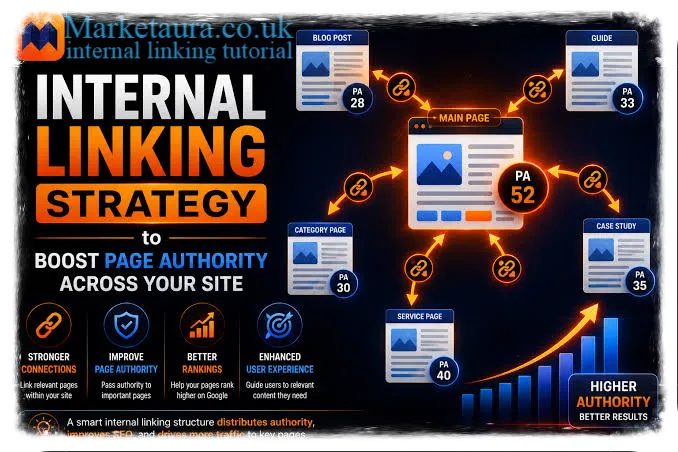
Does Internal Linking Improve SEO?
Yes, and there is solid reasoning behind it. Search engines use internal links to crawl and index your site more efficiently. When a page has zero internal links pointing to it, search engines may struggle to even find it, let alone rank it well.
Internal linking also helps distribute what is often called link equity. If one of your pages has strong backlinks from other websites, linking from that page to a newer page passes along some of that authority. This can genuinely speed up how quickly a new page starts ranking.
Beyond traditional search engines, internal linking has become even more important for AI models and AI powered search tools. Here is how to think about it moving forward. marketaura
Build Content Clusters for Topical Authority
Group related articles around a central theme. If your main topic is digital marketing, create supporting articles around email marketing, social media, and content strategy, all linking back to a central hub page.
Link Your Main Guide to Supporting Articles
Your pillar or main guide should act like a table of contents, linking out to detailed articles that expand on subtopics. This structure signals depth and expertise. source: Yoast
Connect Semantically Relevant Pages
Link pages that share meaning and context, even if they do not use the exact same keywords. This helps both readers and AI models understand the bigger picture of your content.
Adopt an Entity Based Linking Strategy
Instead of only linking based on keywords, think about linking based on entities, meaning people, places, concepts, or things your content discusses. This mirrors how modern search algorithms actually process information. marketaura
Create Content Pathways Based on User Journey
Map out how a reader moves from beginner content to advanced content, and link accordingly. A first time visitor and a returning expert should each find a natural next step.
Develop AI Friendly Content Hubs
Structure your site so that related content is easy to find and logically connected. This makes it easier for AI tools to understand your site as a trusted, organized source of information.
Conclusion
internal-linking-tutorial seem like a small detail, but it has a real impact on how your website performs, both for human readers and for search engines. When you connect your pages thoughtfully, you help visitors find what they need, you help search engines crawl your site more effectively, and you build the kind of topical authority that AI models are increasingly looking for.
Start small. Go back to a few of your older posts this week and add two or three relevant internal links. You will likely notice more engagement and better crawl activity over time. Have you tried restructuring your internal links before? I would love to hear what worked for you.
FAQs
What is the difference between internal and external links?
Internal links point to other pages on your own website, while external links point to pages on a different website.
Can too many internal links hurt my SEO?
Yes, overloading a page with unnecessary links can confuse readers and dilute the value of each individual link.
Should I use exact match keywords in my anchor text?
It helps to include relevant keywords, but natural, descriptive anchor text usually performs better than forced exact matches.
How often should I update my internal links?
Whenever you publish a new article, go back and add links from a few older, relevant posts to keep your structure fresh.
Do internal links affect page load speed?
No, internal links themselves do not slow down your site, since they are just text based navigation elements.
About the Author: content strategist is with hands on experience in SEO driven publishing, focused on helping websites build clear, well connected content structures that perform for both readers and search engines.
email: johanharwen@314gmail.com
Author Name: content strategist