Internal Linking Examples for SEO: Proven Ways to Improve Website Performance in 2026


Introduction
Internal linking is one of the most powerful yet often overlooked SEO strategies that can help websites improve rankings, increase user engagement, and boost overall performance. By connecting relevant pages within your website, you make it easier for search engines to understand your content structure while helping visitors discover more valuable information.
In 2026, effective internal linking is more important than ever as search engines focus on content relevance, user experience, and topical authority. From improving page visibility to distributing link equity across your website, the right internal linking strategy can make a significant difference. In this guide, we will explore practical internal linking examples for SEO and proven methods to strengthen your website’s performance.
What is an internal link
An internal link is simply a link that connects one page on your website to another page on the same website. It is different from an external link, which points to a completely different domain. Think of internal links as signposts inside your own store, guiding visitors from one aisle to the next. They can appear in your navigation menu, within your blog content, in your footer, or even inside a call to action button. The goal is always the same. You want to help people (and search engines) move smoothly through your content.
Why are internal links important
Internal links do more than just connect pages. They shape the entire experience of your website.
Here is why they matter so much.
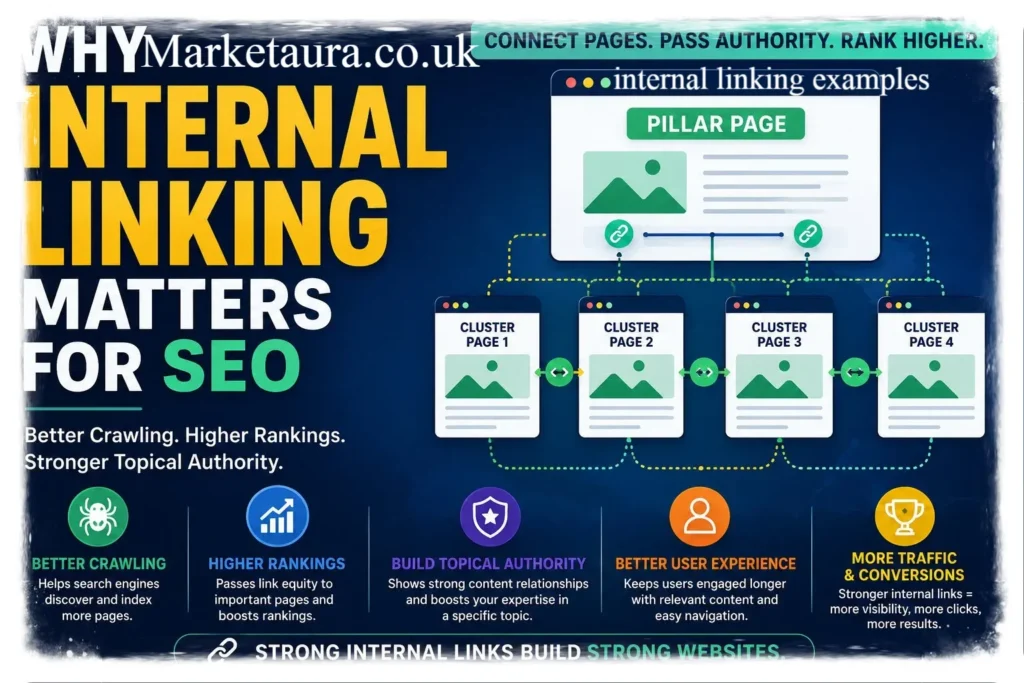
They help visitors discover more content, which keeps them engaged longer. They reduce bounce rate because readers have somewhere else to go. They spread authority from your strongest pages to newer or weaker ones. They help search engines crawl and index your site more efficiently. They support your overall site structure, making it easier to update and manage.
I have personally seen simple internal linking tweaks turn a forgotten blog post into one of the top performing pages on a site. It really does not take much effort, but the impact can be huge.
How do internal links improve SEO
Search engines use links to understand relationships between pages. When you link one page to another using relevant anchor text, you are telling search engines what that page is about. This helps your content rank for the right search terms.
Internal links also help distribute what is often called link equity or ranking power. If one page has a lot of backlinks from other websites, linking from that page to another page on your site can pass along some of that authority. This is one of the most underrated internal linking examples in practice, yet many site owners overlook it completely.
Beyond rankings, internal links also improve crawl efficiency. Search engine bots follow links to discover new content. Without internal links, some pages might never get indexed at all, no matter how good the content is.
What are the best internal linking examples
Some of the most effective internal linking examples include the following.
Linking from a high traffic blog post to a related, less visible article. Adding a link inside your homepage to your most important service or product page. Connecting a beginner guide to a more advanced follow up article. Using breadcrumb navigation on ecommerce or blog category pages. Adding related posts sections at the end of an article.
The best examples always feel natural. If a link feels forced or irrelevant, readers notice, and so do search engines.
How many internal links should a page have
There is no strict rule, but there is a helpful guideline. Most SEO experts suggest keeping internal links relevant and reasonable rather than stuffing a page with dozens of them.
A good rule of thumb looks like this. source: Semrush
Short blog posts (under 1000 words) can include around 2 to 4 internal links. Longer articles (1500 words or more) can comfortably include 5 to 10 internal links. Category or hub pages can include more, since their purpose is to guide navigation.
The key is quality over quantity. Every internal link should genuinely help the reader, not just exist to please a search engine algorithm.
Simple explanation of internal linking examples
If this still feels a bit technical, here is the simplest way to think about it. Imagine your website is a house, and each page is a room. Internal links are the doors and hallways connecting those rooms. Without them, visitors get stuck in one room with no way to explore the rest of the house.
A simple example would be a recipe blog. If you write a post about making pasta, you might link to another post about the best pasta sauces, or a guide on choosing kitchen tools. Each link naturally continues the reader’s journey.
Step by step internal linking examples
Let us walk through a simple step by step process you can apply today.
Step one, review your existing content and identify your most valuable or high traffic pages. Step two, look for older or newer posts that relate to those top pages. Step three, add a natural link using descriptive anchor text, not generic phrases like click here. Step four, make sure the link fits contextually within the sentence or paragraph. Step five, check that the linked page is genuinely useful to someone reading the current page. Step six, repeat this process regularly as you publish new content.
This simple workflow is one of the easiest internal linking examples to implement, even if you are just starting out with SEO.
Real world internal linking examples
Many popular websites use internal linking strategically without readers even realizing it. News websites often link to related past articles within a current story. Ecommerce websites like clothing or electronics stores often link related products together, encouraging visitors to browse more items. Educational websites often link beginner tutorials to intermediate and advanced tutorials, creating a learning path.
These real world internal linking examples all share one thing in common. They prioritize the reader’s journey first, and SEO benefits naturally follow.
Internal linking examples for small business websites
Small business websites often have fewer pages, but that does not mean internal linking matters less.
Here are some practical examples.
Link your homepage to your main service pages using clear, descriptive text. Link blog posts back to relevant service pages, such as linking a tips article to a booking page. Link your about page to your contact page to build trust and encourage action. Link customer testimonials or case studies to the services they relate to.
Even a small local bakery or repair shop website can benefit significantly from simple, thoughtful internal linking.
Internal linking examples for affiliate blogs
Affiliate blogs rely heavily on internal linking to guide readers toward review pages and buying guides.
Some strong examples include the following. source: Yoast
Linking a general buying guide to specific product review posts. Linking comparison articles to individual product reviews for more detail. Linking older review posts to newer, updated versions of the same topic. Linking informational posts to relevant product roundups.
I have noticed affiliate sites that use this strategy well tend to keep readers engaged much longer, which often leads to better conversions and more clicks toward outbound offers.
Conclusion
Internal linking examples are not just a technical SEO detail. They shape how visitors experience your website, and how search engines understand your content. By connecting related pages naturally, you help readers stay longer, discover more value, and trust your site more. Whether you run a small business website, a personal blog, or an affiliate site, the principles remain the same. Link with purpose, keep it relevant, and always think about the reader first. Now it is your turn. Take a look at your own website today and see where a simple internal link could make a real difference. If this article helped you, feel free to share it with someone building their own website.
FAQs
Q1 What is the difference between internal and external links?
Ans Internal links connect pages within the same website, while external links point to a different website entirely.
Q2 Do internal links really affect SEO rankings?
Ans Yes, they help search engines understand site structure and distribute ranking authority across pages.
Q3 Can too many internal links hurt my website?
Ans Yes, excessive or irrelevant links can confuse readers and dilute the value of each link.
Q4 Should I use exact match anchor text every time?
Ans No, it is better to use natural, descriptive anchor text rather than repeating the same exact phrase constantly.
Q5 How often should I update my internal linking strategy?
Ans It is a good idea to review your internal links every few months, especially after publishing new content.
Author Bio: The author is a content writer with a strong interest in practical SEO strategies. They enjoy breaking down technical topics into simple, everyday language that helps website owners make real improvements without feeling overwhelmed.
email: johanharwen@314gmail.com
Author Name: The author