Introduction
Getting a WordPress website online is easy. Getting it discovered by search engines is a different challenge. You can publish useful content every week, but poor technical SEO, weak page structure, slow loading times, or missing metadata can hold your site back.
That is why a practical WordPress SEO checklist matters. It gives you a clear process for improving your website without making SEO feel overwhelming.
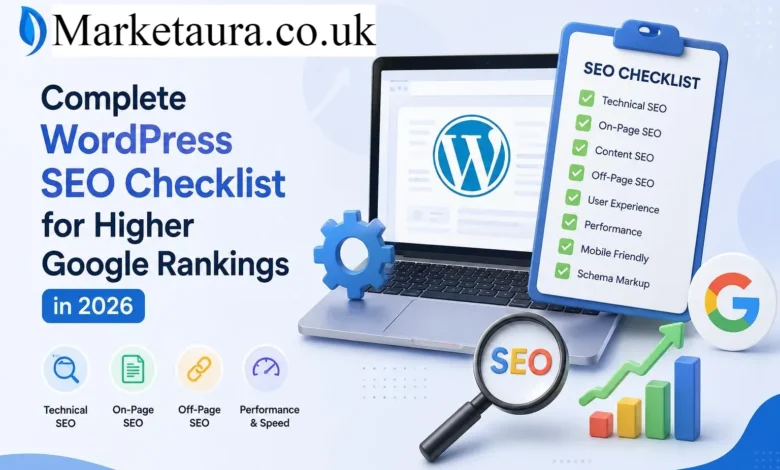
In this guide, you will learn how to optimize your WordPress settings, pages, images, content, links, technical SEO, mobile experience, and performance. You will also see which tasks deserve the most attention and which common mistakes you should avoid.
Whether you manage a blog, business website, online store, or personal site, you can use this checklist as a repeatable SEO workflow.
What Is a WordPress SEO Checklist?
A WordPress SEO checklist is a structured list of tasks that helps you optimize a WordPress website for search engines and users.
It usually covers:
- Technical SEO
- Keyword research
- On page SEO
- Content optimization
- Image SEO
- Internal linking
- Website performance
- Mobile usability
- Structured data
- Local SEO
- Search engine indexing
- SEO monitoring
The goal is simple. You want search engines to understand your website while giving visitors a fast, useful, and easy experience.
Why Is WordPress SEO Important?
WordPress provides a strong foundation, but it does not automatically optimize every part of your website.
You still need to control important elements such as titles, descriptions, headings, URLs, internal links, images, indexing settings, and structured data.
Google also evaluates many signals related to relevance, usability, page experience, and content quality. This means publishing content alone is not enough.
A good SEO process helps you find problems before they become bigger ranking issues.
WordPress SEO Checklist: Essential Setup
Start with the foundation before optimizing individual articles.
Source: Semrush
1. Choose a Search Friendly Site Structure
Your website should have a logical structure that visitors and search engines can understand.
For example:
Homepage → Category → Article
Avoid creating unnecessary layers of categories and pages. Keep important content within a reasonable number of clicks from your homepage.
2. Set a Preferred URL Format
Decide whether your website uses a consistent URL format.
Keep URLs:
- Short
- Descriptive
- Easy to read
- Relevant to the page
- Free from unnecessary numbers and characters
For example, /wordpress-seo-checklist/ is clearer than a URL containing random parameters.
3. Check Search Engine Visibility
WordPress includes a setting that can discourage search engines from indexing your website.
Check your WordPress reading settings and make sure you have not accidentally enabled the option that discourages search engines from indexing the site.
This small setting can create a major SEO problem.
4. Create an XML Sitemap
An XML sitemap helps search engines discover important URLs on your website.
Modern WordPress installations can generate sitemap functionality automatically, while SEO plugins can provide additional controls.
After creating your sitemap, check that it contains the URLs you actually want search engines to discover.
On Page WordPress SEO Checklist
Once the technical foundation is ready, optimize every important page.
5. Perform Keyword Research
Choose a primary keyword that matches the search intent behind your page.
For example, someone searching for WordPress SEO checklist probably wants a practical guide rather than a general explanation of WordPress.
Also research related terms such as:
- WordPress SEO tips
- WordPress SEO settings
- WordPress on page SEO
- WordPress technical SEO
- SEO checklist for WordPress websites
- How to optimize WordPress for Google
Use these terms naturally. Do not force them into every paragraph.
6. Write a Strong SEO Title
Your title should tell readers exactly what they will gain.
A useful formula is:
Primary Keyword + Benefit + Emotional Trigger
For example:
WordPress SEO Checklist: Powerful Fixes for Better Rankings
Keep your title natural and compelling rather than writing it only for search engines.
7. Optimize Meta Descriptions
A meta description should encourage the searcher to click.
Include the main topic, communicate the benefit, and make the description easy to understand.
Remember that search engines may rewrite descriptions when they believe another excerpt better matches the query.
8. Use Proper Headings
Use one clear H1 for the main topic.
Then organize supporting sections with H2 and H3 headings.
Source: Search Engine Journal
A useful structure could look like this:
| Heading | Purpose |
|---|---|
| H1 | Main page topic |
| H2 | Major topic |
| H3 | Supporting detail |
| H4 | Specific question or subsection |
Good headings also make long content easier to scan on mobile devices.
Content Optimization Checklist
9. Match Search Intent
Before publishing, ask:
What does the searcher actually want?
Search intent commonly falls into categories such as informational, navigational, commercial, and transactional.
Your content should satisfy the dominant intent instead of simply repeating keywords.
10. Provide Direct Answers
Answer important questions early.
For example:
What is the most important WordPress SEO task?
Start by ensuring search engines can crawl and index your important pages. Then improve relevance, content quality, internal linking, performance, and user experience.
This question first approach supports answer focused search experiences and makes your content easier to scan.
11. Build Helpful Content
Do not write content simply to reach a word count.
Add useful information such as:
- Examples
- Original observations
- Step by step instructions
- Comparisons
- Tables
- Expert insights
- Common mistakes
- Practical recommendations
Your content should solve the reader’s problem better than a generic article.
Image SEO Checklist for WordPress
Images can improve engagement, but poorly optimized images can also slow your website.
12. Compress Images
Use appropriately sized images instead of uploading huge files.
Modern formats such as WebP can reduce image file size while maintaining good visual quality.
13. Write Useful Alt Text
Alt text should describe the image when the image provides meaningful information.
Avoid stuffing keywords into every image description.
Instead of writing:
WordPress SEO checklist WordPress SEO tips WordPress SEO
write something descriptive, such as:
WordPress SEO checklist displayed on a website optimization dashboard
14. Use Descriptive File Names
Before uploading an image, use a meaningful filename.
A descriptive filename can provide additional context and makes your media library easier to manage.
Technical SEO Checklist
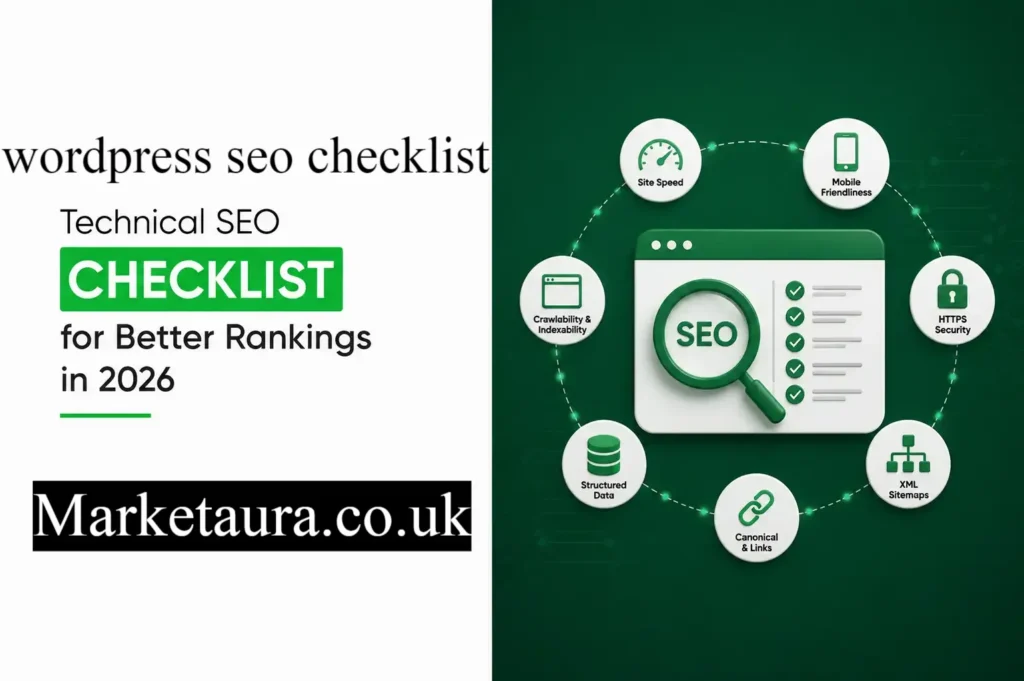
Technical SEO helps search engines crawl and understand your website.
15. Check Robots.txt
Make sure your robots.txt rules do not accidentally block important resources or pages.
16. Find Broken Links
Broken internal links create a poor user experience and can make website maintenance harder.
Run regular checks and replace or remove outdated links.
17. Fix Redirect Problems
Avoid unnecessary redirect chains.
When you permanently move a page, use an appropriate permanent redirect and update internal links when possible.
18. Use HTTPS
Your website should use HTTPS.
A secure connection protects information exchanged between your website and visitors and provides a basic trust signal for modern websites.
19. Create a Mobile Friendly Website
Your website should work properly on smartphones and tablets.
Check:
- Text size
- Navigation
- Buttons
- Images
- Forms
- Page layout
- Horizontal scrolling
Mobile usability matters because a large share of web browsing happens on mobile devices.
Website Speed and Core Web Vitals
Website performance deserves a place near the top of your WordPress SEO checklist.
Google’s Core Web Vitals focus on important aspects of user experience, including loading performance, responsiveness, and visual stability.
You can improve performance by:
- Compressing images.
- Removing unnecessary plugins.
- Using suitable caching.
- Reducing excessive scripts.
- Choosing reliable hosting.
- Keeping WordPress and plugins updated.
- Avoiding unnecessary design elements.
Do not chase a perfect score at the expense of usability. Your priority should be a fast website that works well for real visitors.
Internal Linking Checklist
Internal links connect related pages across your website.
They help visitors discover more information and help search engines understand relationships between pages.
For example, an article about WordPress image optimization can naturally link to another article about technical SEO.
Use descriptive anchor text and link only when the destination genuinely helps the reader.
Structured Data and SEO Plugins
Structured data can help search engines understand specific types of content.
Depending on your website, you may use structured data for:
- Articles
- Products
- Organizations
- Local businesses
- Events
- Breadcrumbs
- FAQs
Popular WordPress SEO solutions include Yoast SEO, Rank Math, and All in One SEO. These tools can simplify many optimization tasks, but no plugin can replace useful content or a sound SEO strategy.
Think of an SEO plugin as a tool that helps you implement SEO. It is not a shortcut to rankings.
WordPress SEO Checklist for Local Businesses
If you operate a local business, add local SEO to your workflow.
Make sure your business information remains consistent across important platforms.
Focus on:
- Business name
- Address
- Phone number
- Opening hours
- Service areas
- Location pages
- Customer reviews
- Local business structured data
A well optimized Google Business Profile can also support local visibility.
WordPress SEO Monitoring Checklist
SEO is not a one time task.
Monitor your website regularly using tools such as Google Search Console and Google Analytics.
Review:
| SEO Area | What to Monitor |
|---|---|
| Indexing | Indexed and excluded pages |
| Search performance | Clicks and impressions |
| Keywords | Queries and positions |
| Traffic | Organic visitors |
| Content | Pages gaining or losing traffic |
| Technical SEO | Crawl and indexing issues |
| Performance | Core Web Vitals |
| Links | Internal and external link health |
Your data can reveal opportunities that keyword research alone cannot identify.
Common WordPress SEO Mistakes to Avoid
Even a technically strong website can lose opportunities because of simple mistakes.
Avoid:
- Publishing thin content
- Stuffing keywords
- Using duplicate titles
- Ignoring search intent
- Uploading oversized images
- Blocking important pages
- Creating confusing URLs
- Installing too many plugins
- Ignoring internal links
- Forgetting old content
- Writing only for search engines
One of the most useful habits is to review older pages regularly. Updating outdated information can often be more valuable than constantly producing new articles.
Quick WordPress SEO Checklist
Use this condensed checklist before publishing:
- Search intent is clear.
- Primary keyword is selected.
- SEO title is compelling.
- Meta description is useful.
- URL is short and descriptive.
- H1 is clear.
- H2 and H3 headings are organized.
- Content answers the main question quickly.
- Related keywords appear naturally.
- Images are compressed.
- Alt text is descriptive.
- Internal links are relevant.
- Important pages are indexable.
- XML sitemap works correctly.
- HTTPS is enabled.
- Website works well on mobile.
- Pages load efficiently.
- Broken links are fixed.
- Structured data is appropriate.
- Search performance is monitored.
Frequently Asked Questions
What is the most important WordPress SEO task?
The most important task is creating useful content that matches search intent while ensuring important pages can be crawled and indexed.
Is WordPress good for SEO?
Yes. WordPress provides a strong foundation for SEO, but you still need to optimize content, technical settings, performance, links, images, and website structure.
Do I need an SEO plugin for WordPress?
You do not strictly need one, but an SEO plugin can make many common optimization tasks easier to manage.
How often should you perform a WordPress SEO audit?
A light review can happen monthly, while a deeper technical audit every few months is useful for many websites. Larger websites may need more frequent monitoring.
Does website speed affect WordPress SEO?
Website performance can affect user experience and is part of Google’s page experience considerations. Improving speed can also make your website more pleasant to use.
How many keywords should you use on a WordPress page?
There is no ideal keyword number. Focus on covering the topic naturally and completely rather than reaching a specific keyword density.
Should every WordPress image have alt text?
Meaningful images should generally have useful alternative text. Decorative images can use empty alt attributes so screen readers can skip them.
How long does WordPress SEO take to show results?
SEO results vary significantly. Competition, website history, content quality, technical health, authority, and search demand all influence how quickly changes become visible.
Can an SEO plugin guarantee higher rankings?
No. SEO plugins can help you implement best practices, but they cannot guarantee search rankings.
Conclusion
A strong WordPress SEO checklist gives you a repeatable system instead of forcing you to guess what needs improvement.
Start with technical foundations. Then optimize your titles, content, headings, images, internal links, structured data, mobile experience, and website performance. After that, monitor your results and improve pages based on real search data.
The biggest SEO advantage often comes from consistency. Small improvements across dozens of pages can create a much stronger website over time.
Use this checklist whenever you publish new content and revisit it during regular SEO audits. Which part of your WordPress SEO needs the most attention right now?
Author Bio: Johan Harwen The author writes practical SEO and digital marketing content focused on helping website owners understand search optimization without unnecessary complexity. Their approach combines clear explanations, actionable checklists, and reader focused strategies.
Email: johanharwen@314gmail.com
Author Name: Johan Harwen