Introduction
Internal linking best practices separate websites that dominate search results from those that stay invisible. When you connect your pages strategically, search engines understand your content better and users find information faster.
Internal linking means adding hyperlinks that connect one page on your website to another page on the same website. This simple concept carries massive SEO power when done correctly. Poor internal linking, on the other hand, confuses search engines and frustrates visitors trying to navigate your content.
This guide covers everything you need to know about internal linking best practices. You will learn what internal linking actually means, why it matters for rankings, how many links each page needs, and the best anchor text strategies. We also include a step by step workflow, comparison table, and practical checklist you can implement today.
What Is Internal Linking in SEO?
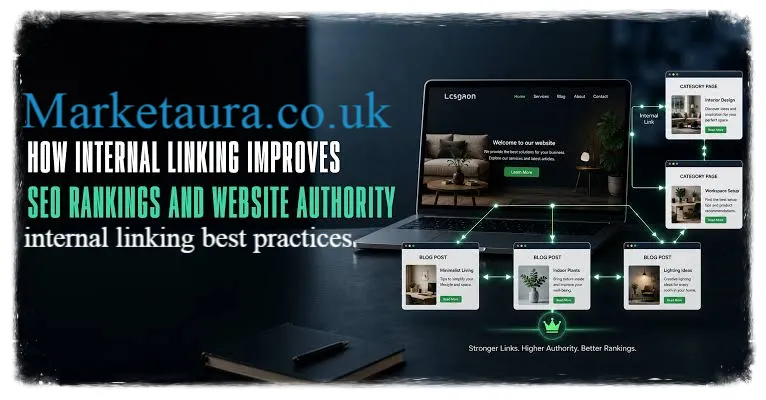
Internal linking in SEO refers to hyperlinks that connect pages within the same website domain. These links help search engines crawl your site efficiently and understand relationships between different pieces of content. Unlike external links pointing to other websites, internal links keep visitors and search engine crawlers moving through your own content.
Think of internal links as roads connecting different neighborhoods in your website. Without roads, some neighborhoods remain isolated and hard to reach. With well planned roads, everything connects smoothly and visitors explore more of your content naturally. source: Shopify
Search engines use internal links to discover new pages, understand content hierarchy, and distribute ranking authority throughout your site. This distribution process, sometimes called link equity, helps important pages rank higher when they receive links from multiple other pages.
Why Are Internal Links Important?
Internal links matter for several critical reasons that directly impact your search performance and user experience.
Search engine crawling improves significantly with proper internal linking. Search engine bots follow links to discover new content. Pages without internal links pointing to them often remain unindexed, meaning they never appear in search results at all.
Link equity distribution happens through internal linking structure. Your homepage typically receives the most external backlinks. Internal links pass some of that authority to other important pages, helping them rank better than they would in isolation.
User navigation becomes intuitive when internal links guide visitors to related content. Someone reading about running shoes might want information about proper sizing. A well placed internal link satisfies that need instantly without requiring a new search.
Session duration increases when visitors click through multiple pages instead of leaving after one page. Search engines interpret longer sessions as positive quality signals, indirectly benefiting your rankings across the entire website.
I have watched underperforming pages jump in rankings simply by adding strategic internal links from high authority pages. This technique costs nothing but time, yet delivers measurable results within weeks.
How Many Internal Links Should a Page Have?
There is no universal magic number for internal links per page, but research and practical experience point toward helpful guidelines.
Most well optimized pages include between 3 and 5 contextual internal links within the main content. This range provides enough navigation options without overwhelming readers or diluting link equity too thin across too many destinations.
Longer, comprehensive articles naturally support more internal links than short pages. A 3000 word guide might reasonably include 8 to 10 internal links, while a 500 word blog post works better with just 2 or 3 carefully chosen links.
Google has never specified an exact limit, but common sense applies here. Adding 50 internal links to a single page looks spammy and provides poor user experience. Focus on quality and relevance rather than hitting arbitrary numbers.
Consider these factors when determining link quantity for any given page: source: Moz
- Content length and depth of coverage
- Number of genuinely related pages on your website
- Natural opportunities within your writing flow
- Balance between navigation menus and contextual links
What Is the Best Anchor Text for Internal Links?
Anchor text refers to the clickable words within a hyperlink. Choosing effective anchor text significantly impacts both user experience and SEO value.
Descriptive anchor text works best for internal linking best practices. Instead of generic phrases, use words that clearly describe the destination page content.
Weak example: Click here for more information
Strong example: Learn proper running shoe sizing techniques
The strong example tells users and search engines exactly what awaits them after clicking. This clarity improves click through rates and helps search engines understand topical relevance between connected pages.
Keyword rich anchor text should feel natural rather than forced. Include relevant keywords when they fit organically into your sentence structure.
Example: Our comprehensive guide to meta description examples covers everything beginners need to know.
Variation matters too. Linking to the same page repeatedly with identical anchor text looks manipulative to search engines. Mix up your phrasing while keeping descriptions accurate and relevant.
Avoid these common anchor text mistakes:
- Using only generic phrases like “click here” or “read more”
- Repeating identical anchor text across multiple pages
- Stuffing keywords unnaturally into anchor text
- Making anchor text too long or complicated
- Using misleading anchor text that does not match destination content
What Is the Difference Between Internal and External Links?
Understanding the distinction between internal and external links helps clarify your overall linking strategy.
| Feature | Internal Links | External Links |
|---|---|---|
| Destination | Same website domain | Different website domain |
| Primary purpose | Site navigation and authority distribution | Reference credibility and additional resources |
| SEO impact | Directly controllable by you | Depends on linked site quality |
| Crawl budget | Helps search engines discover your pages | Sends crawlers away from your site |
| Link equity | Distributes authority within your site | Can pass authority to other domains |
| Control level | Complete control over placement and anchor text | Limited control over destination content changes |
Internal links keep visitors engaged with your content longer. External links provide credibility by referencing authoritative sources, but they also create exit points where visitors leave your website entirely.
Both link types matter for comprehensive SEO strategy. Internal linking best practices focus on your own content ecosystem, while external links demonstrate research quality and industry engagement.
Step by Step Internal Linking Workflow
Follow this practical workflow to implement internal linking best practices systematically across your website.
Step 1: Audit your existing content Create a spreadsheet listing all published pages on your website. Note the primary topic and target keyword for each page.
Step 2: Identify your pillar pages Determine which pages cover broad, important topics. These pillar pages should receive the most internal links from related content.
Step 3: Map content relationships Group related pages together based on topic similarity. This mapping reveals natural linking opportunities you might otherwise miss.
Step 4: Add contextual links during content creation Whenever you publish new content, immediately link to 3 to 5 relevant existing pages using descriptive anchor text.
Step 5: Update older content regularly Revisit existing pages quarterly to add links to newer, relevant content published since the original publication date.
Step 6: Monitor performance metrics Track which pages receive the most internal link clicks using analytics tools. This data reveals which linking strategies actually drive engagement.
Step 7: Fix broken internal links Regularly scan your website for broken internal links using SEO tools. Broken links frustrate users and waste crawl budget.
Practical Examples With Anchor Text
Seeing real examples helps clarify how internal linking best practices work in actual content.
Example 1: Blog post about content marketing Original sentence: For more tips, check this page. Improved sentence: For more tips, explore our complete content marketing strategy guide.
Example 2: Product page linking to related items Original sentence: See other products here. Improved sentence: Browse our collection of waterproof hiking boots for winter conditions.
Example 3: Service page linking to case studies Original sentence: Learn more about results. Improved sentence: Read how we increased organic traffic by 150 percent for a local business.
Each improved version provides context that helps both readers and search engines understand exactly what information awaits on the linked page.
Internal Linking Implementation Checklist
Use this checklist to ensure you consistently apply internal linking best practices across your website.
- Identify 3 to 5 relevant internal linking opportunities for every new page
- Write descriptive, keyword relevant anchor text for each link
- Avoid generic phrases like “click here” throughout your content
- Link to your most important pillar pages from multiple related articles
- Vary anchor text when linking to the same destination page repeatedly
- Update older content quarterly with links to newer relevant articles
- Check for and fix broken internal links every few months
- Ensure navigation menus complement, not replace, contextual internal links
- Balance link quantity based on content length and genuine relevance
- Track internal link click performance using analytics tools
Working through this checklist for every published page creates cumulative benefits that compound over time.
Conclusion
Internal linking best practices provide one of the most cost effective ways to improve your website search performance. Unlike backlink building, which requires outreach and relationship building, internal linking remains entirely within your control.
The strategies covered here, including proper anchor text selection, appropriate link quantity, and systematic workflow implementation, work together creating a stronger, more discoverable website. Search engines reward sites with logical, well connected content structures.
Start applying these internal linking best practices today. Choose your most important pages, identify natural linking opportunities, and watch your search visibility improve over the coming months. Which page on your website needs internal linking attention first?
FAQs
1. How soon will internal linking improve my rankings?
Most websites notice ranking improvements within 4 to 8 weeks after implementing strategic internal linking, though results vary based on website size and competition level.
2. Should internal links open in new tabs?
Internal links should typically open in the same tab. This creates smoother navigation flow and avoids cluttering visitor browsers with multiple open tabs unnecessarily.
3. Can too many internal links hurt my SEO?
Yes, excessive internal linking dilutes link equity and appears spammy to search engines. Focus on quality, relevant connections rather than maximizing link quantity.
4. Do internal links need to be in the main content?
Contextual links within main content carry more weight than navigation menu links, though both contribute to overall site structure and user experience.
5. Should I use the same anchor text every time I link to a page?
No, vary your anchor text naturally while keeping it accurate and relevant. Identical repeated anchor text across many pages can appear manipulative to search engines.
About the Author : Sarah Mitchell is a digital marketing strategist with ten years of experience helping businesses improve their search engine visibility. She specializes in on page SEO, internal linking strategy, and technical optimization. Sarah has worked with over 200 websites across various industries, consistently delivering measurable traffic growth through practical, data driven techniques.
email: johanharwen@314gmail.com
Author Name: Sarah Mitchell